Overriding Methods in Ruby on Rails: A No-Code-Editing Approach
Discover how to override a class or instance method without editing its source file in Ruby on Rails.
The context
Recently, I installed the Writebook a Ruby on Rails app from 37signals because I wanted to publish some long essays or long-form articles about testing for developers.
The installation worked like a charm, including replacing Rescue with Solid Queue and adding Solid Cable. I installed it manually, not via the once tool as I already have other projects on that specific server and did not had enough time to think how deploying it via the provided tool will affect the other projects. This means I would have to update it when an update came around manually.
It is currently published at https://booklet.goodenoughtesting.com, and I suggest checking it out if you are interested in improving your testing skills as a developer.
During the installation, I was pleasantly surprised to find that the Writebook app automatically creates a new book, which is the manual of the Writebook itself, at the first run. This is a great user experience, having the manual as the first book.
But when I wanted to create my book, I noticed that the URL was:
https://booklet.goodenoughtesting.com/2/my-own-book
Notice the 2 in that URL? I did not want that.
I could have deleted everything, reset the auto-increment, disabled the foreign key check for SQLite, and updated my book’s ID. I have used these techniques on various occasions in the past, and while effective, they are solutions that I would only use if required. Messing with DB increment and foreign keys should be a solution only when everything else fails.
The easiest solution - to comment out the code
The most straightforward solution was to open the log file and see what was executed. I found that the FirstRunsController executes FirstRun#create!, which then creates an account and calls DemoContent.create_manual.
Side note, and maybe to the surprise of some people: the first_run.rb file can be found in app/models/first_run.rb, but it is not an Active Record model.
Rails Guides agrees with this, but this is a side note.

Let’s go back to WriteBook and try not to have the first book created automatically.
I could have just added comments for that call to DemoContent, but then I could have stopped there and learned nothing but to resolve the problem without spending too much time and refresh some things about Ruby and Rails 😀
I decided not to edit the Writebook code too much, as I wanted to be able to update it easily. I remember hacking the core WordPress code in 2006/2007 and having to re-apply all my changes every time there was an upgrade. I want to avoid that experience here.
The beauty of Ruby as a dynamic programming language
Thinking about Ruby as a dynamic programming language and Rails as a long-standing web framework and knowing both of them allows you to do almost any crazy thing you can think of in terms of customization.
So, the simplest solution for me would be to add a file in the config/initializers that will override DemoContent#create_manual. This way, all the Writebook code remains untouched, except this file, making the upgrade process simple.
Hooking into Rails initialization
After looking into all the initialization events for Rails 8 and talking with my friend Adrian I decided to use to_prepare, which is described as:
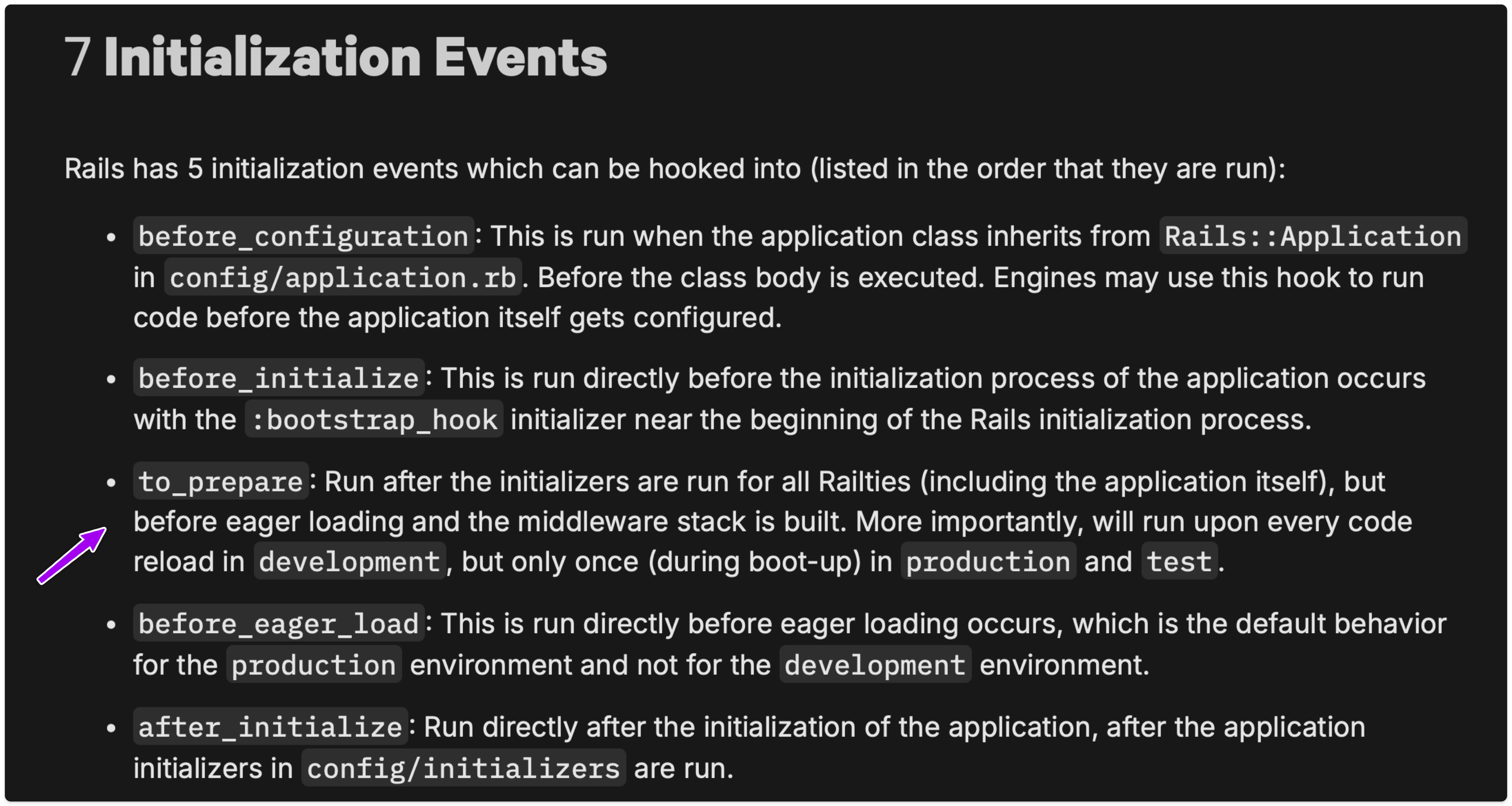
and so I wrote the simplest code in an intializer:
# config/initializers/personal_overrides.rb

Rails.application.config.to_prepare do
  class DemoContent
    def self.create_manual(user)
      Rails.logger.info "Overriding create_manual"
    end
  end
end
This just opens the DemoContent class method (after it was loaded) and will add a logger info without doing anything else.
It worked and after I did a rails db:reset and opened the web app, there I had the beautify of nothing: no book created. Which is wat I was trying to solve so now my book has the id = 1.
By the way a great talk about the Rails boot process is this one from Xavier Noria at Rails World: https://www.youtube.com/watch?v=Kx0ihLCTEgE
Other ways to override a class method
There I asked myself, what are other waysto override a class method without editing the file where the class is defined and I got a few ideas. Probably there are much more then the ones I tried here.
Three ways to use prepend
Among the first things, I remembered that I don’t use prepend too much.
- Defining a simple module and then using prepend on the
singleton_classwhich basically means that we want the methods fromDemoContentOverrideto be called first when they are found and we usesingleton_classto inject them into the class methods.
Rails.application.config.to_prepare do
  module DemoContentOverride
    def create_manual(user)
      Rails.logger.info "Overriding create_manual"
    end
  end

  DemoContent.singleton_class.prepend(DemoContentOverride)
end
- We can of course open the
DemoContentclass, define a method inside it and prepand that module from within the class
Rails.application.config.to_prepare do
  DemoContent.singleton_class.class_eval do
    module DisableCreateBook
      def create_manual(user)
        nil
      end
    end

    prepend DisableCreateBook
  end
end
- Doing the same as in step 2 but with an anonomious module:
Rails.application.config.to_prepare do
  DemoContent.singleton_class.prepend(Module.new do
    def create_manual(user)
      Rails.logger.info "Overriding create_manual"
    end
  end)
end
Using undef_method or remove_method
Another solution is just to remove the method and then create another one.
Here undef_method and remove_method can be used (for our need they are doing similarish things, but there is difference there in case there is an inheritance chain):
Rails.application.config.to_prepare do
  DemoContent.singleton_class.undef_method(:create_manual)
  DemoContent.singleton_class.define_method(
    :create_manual,
    lambda { |user| Rails.logger.info "Overriding create_manual" }
  )
end

# or

Rails.application.config.to_prepare do
  DemoContent.singleton_class.undef_method(:create_manual)
  DemoContent.singleton_class.define_method(
    :create_manual,
    ->(user) { Rails.logger.info "Overriding create_manual" }
  )
end
Using the singleton class notation class « <Class>
Rails.application.config.to_prepare do
  class << DemoContent
    def create_manual(user)
      Rails.logger.info "Overriding create_manual"
    end
  end
end
The class « DemoContent from here is similar with doing:
class DemoContent
  class << self
    def create_manual(user)
      Rails.logger.info "Overriding create_manual"
    end
  end
end
This is my exploration so far that at least for me, shows the power of Ruby language and the beauty of having access to the code of the web app that I use.
What about an instance method
A similarish approach works for instance methods too. But you don’t need to use the singleton/Eigenclass for that. You can just prepend or undef_method on the instance methods and there is no need to work with the class singleton/eigenclass.
Say the DemoContent would have had the following structure:
class DemoContent
  def initialize(user)
    @user = user
  end

  def create_manual
    # ...
  end
end
So the call for it would have been DemoContent.new(user).create_manual.
In this case I would need the following in my initializer if I wanted to just open the class after it was loaded and change the instance method:
Rails.application.config.to_prepare do
  class DemoContent
    def create_manual
      Rails.logger.info "Overriding create_manual"
    end
  end
end
or write this if I wanted to use the prepend:
Rails.application.config.to_prepare do
  module TestObjectOverride
    def original_method
      Rails.logger.info "Overriding create_manual"
    end
  end

  TestObject.prepend(TestObjectOverride)
end
or this if you want to use undef_method and redefine it again with define_method:
Rails.application.config.to_prepare do
  DemoContent.undef_method(:create_manual)

  DemoContent.define_method(
    :create_manual,
    ->(user) { Rails.logger.info "Overriding create_manual" }
  )
end
👉 If you want to learn test case design and write fewer tests while covering more features, I invite you to one of my 3-hour live online workshop.